 TinyTrigger
The ultimate keyboard automation tool for Windows and Linux. Execute scripts, trigger webhooks, and control your smart home. All with simple keyboard shortcuts.
Free Tier: 5 triggers • Lifetime License: €9 unlimited triggers
curl -sSL https://tinytrigger.io/install.sh | bash
🏠 Built for Home Assistant Users
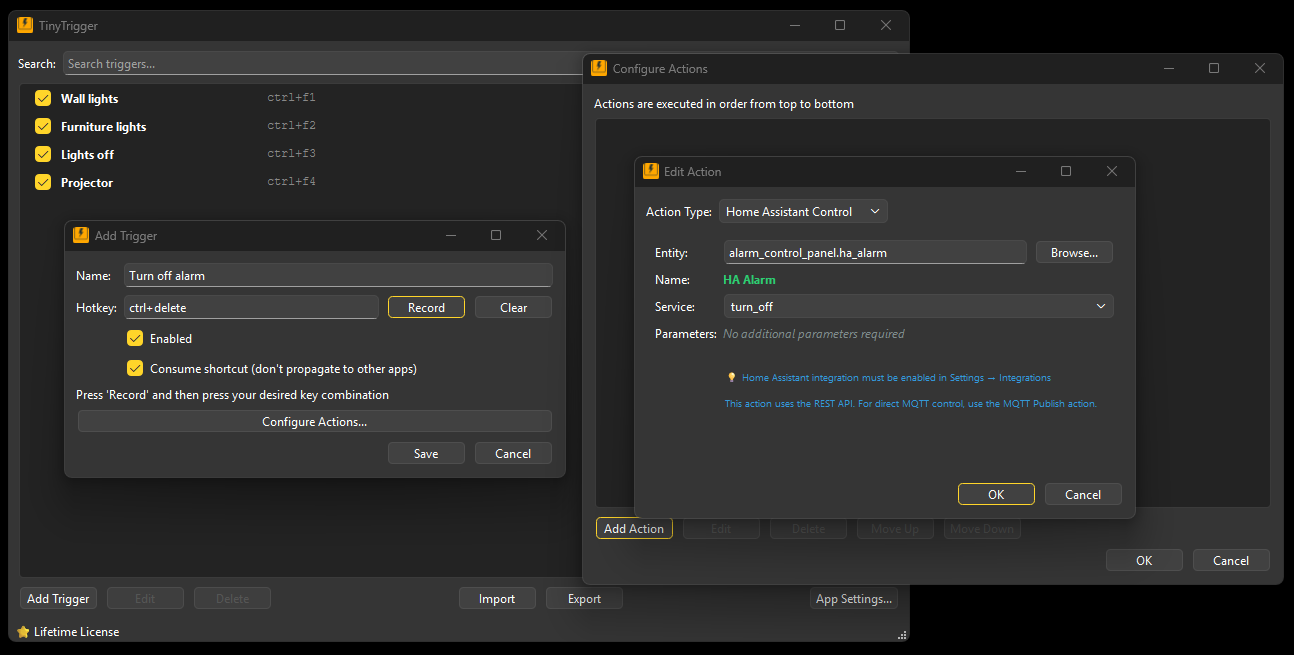
TinyTrigger is the missing link between your keyboard and your smart home. Control lights, thermostats, and media players with hotkeys. Execute keyboard shortcuts from your Home Assistant dashboard or voice assistants.
Example: Press Ctrl+F1 to trigger "Movie Time"
1. Dim living room lights to 30% (warm white)
2. Turn on TV and set to Netflix
3. Close window blinds
4. Set thermostat to 21°C
5. Send Discord notification: "Movie started 🍿"
✨ Or trigger it with: "Hey Google, activate movie time" → Home Assistant → MQTT → TinyTrigger
Three Ways to Automate Everything
System & Macros
Keystrokes & Scripts
Chain keyboard shortcuts and execute .exe, .bat, or .sh files instantly.
Perfect for: Display modes, app launching, workflow automation
Web & API Power
HTTP & Webhooks
Trigger cloud APIs and web services with native GET/POST request support.
Perfect for: Discord bots, CI/CD pipelines, cloud services
Smart Home Superpower
Native HASS & MQTT
The only tool that lets you browse and control your smart home directly from your PC.
Perfect for: Home Assistant users, voice control, MQTT devices
💡 Use Cases
TinyTrigger helps you automate repetitive tasks and control your devices with simple keyboard shortcuts.
Perfect for:
- Control Home Assistant devices with keyboard shortcuts (lights, climate, media players)
- Trigger TinyTrigger hotkeys via voice commands ("Hey Google, start streaming")
- Execute complex automation chains across multiple platforms
- Switching monitor configurations and display modes
- Launching applications and scripts instantly
- Triggering webhooks and API calls
- Bridge keyboard shortcuts with smart home automations
✨ Features
Global Hotkeys
System-wide keyboard trigger detection that works everywhere
HTTP Requests
Control smart home devices, APIs, and webhooks with a keypress
Execute Commands
Run scripts, batch files, and programs instantly
Action Chaining
Execute multiple actions in sequence with delays
Cross-Platform
Native UI on both Windows and Linux
Auto-Start
Launch automatically with system boot
JSON Config
GUI editor with manual editing support
Import/Export
Share configurations across machines easily
Lifetime License
Pay once (€9), use forever with unlimited triggers
Home Assistant Integration
Native bidirectional integration with Home Assistant - browse and control all your smart home entities
MQTT Auto-Discovery
Publish TinyTrigger shortcuts to Home Assistant dashboard. Browse and control MQTT devices directly - no configuration needed.
Ready to automate?
curl -sSL https://tinytrigger.io/install.sh | bash